The We Buy Any Gun tool is only available to Armslist Premium members. Click here to upgrade now!
Confirmation!
Cancel Subscription
Cancellation Reason
Reason
Suggested Address
We updated your Billing Shipping address details using an address validation service. Please confirm this is accurate.
,
,
When you add or change your Billing Shipping address, we use an address verification tool to ensure it's accuracy. The address you entered is coming back as invalid. Please check the address and resubmit it, or contact us at [email protected], or 724-578-4740.
GovX Account Verification
Your GovX account verification is still awaiting approval. Check back later or Click here to view the status at GovX.
GovX Information
ARMSLIST has partnered with GovX to provide current and former military members
Premium Subscriptions at a well deserved discount. If this is your first time using GovX, please be aware the verification process can take a few days. Need help? Click here
Thank you for your support!
We at Armslist are a small group of men and women that hold high the U.S. Constitution, and battle daily with God's strength to protect your inalienable right to keep and bear Arms. Your support, through your active subscription, helps fuel our tireless endeavor to keep Armslist up and running as a bastion of the Second Amendment, facing frivolous lawsuits filed against us by the likes of unhinged leftist organizations like the Brady Campaign, and more.
-The Armslist Team
OpenID is a system that allows you to use
a single login for a variety of different websites. OpenID works by allowing you to select
a provider that you already have an account with, such as Google, AOL, or Yahoo. Login
is transferred to the selected provider. The provider verifies your login information
and control is transferred back to ARMSLIST.
It seems that every website requires you to create
an account. You end up with tons of usernames and passwords that you have to try to remember.
OpenID allows you to reuse these logins in a secure way. Basically, it's simpler.
Please email [email protected] with the subject line "Pending Account Upgrade." PLEASE INCLUDE YOUR BILLING ADDRESS. Also, be sure to use the email address you used to create the account.
First, try a password reset using the email address you signed up with here. If that doesn't work, there could be a known issue with your account. Please contact us at [email protected] with the subject line "Missing Account."
Armslist will NEVER charge you more than $6.99/mo via credit card for a Premium Personal Account. Any further charges are likely return charges or NSF fees from your financial institution. We suggest contacting them regarding the fees.
Please head to Create an Account in the top right hand corner of the page. You will be prompted to select either a Premium Personal, or Premium Vendor account. Choose Premium Vendor and head through the billing setup process. We will approve your account as soon as we've received your FFL or business license.
We are still waiting to receive your FFL or business license. Please send it to us via our Contact Us page. We will activate your account as soon as we review it.
The following features enhance your ability to move inventory, drive internet traffic to your own website, as well as drive foot traffic through your front door:
Enhanced virtual storefront including your phone number, e-mail, address and more!
Hyperlinks to your website or URL of your choosing
Listing history
Page view counter on all listings
Ability to create up to 1500 listings.
You are still required to abide by anti-spamming rules.
Skip listing confirmation email
Pre-fill email address
Auto-select HOME location
Display dealer profile in listings
Skip reCaptcha during listing creation
Listings cannot be flagged
Users can now search by “Dealers that Ship” to more easily find you!
Direct access to our development team for questions, problems, or feature requests.
After your Premium Vendor subscription has been approved by our staff after validating your FFL, you will need to create a Vendor Profile. To do so, head to your Account Dashboard, and then click or tap "Vendor Profile" - here you will be able to fill in your Vendor Profile, and then go on to create Premium Vendor listings.
The Armslist Heroes Program gives current and former Military members a well deserved discount on both Premium Personal and Premium Vendor (business use) accounts.
Head to armslist.com/military. After clicking SIGN UP NOW! you'll be prompted to verify your service using either existing GovX credentials, or by creating a new GovX account on the following page.
GovX is a service that instantly and securely verifies an individual's Military status, without the individual having to upload any documents, or share sensitive information.
Please ensure you do not have security software, VPNs, or ad removal software running while browsing ARMSLIST. Software such as AdBlock, VPNs (Virtual Private Networks), browsers like DuckDuckGo, and more
may cause certain pages to fail to load correctly. Also, please be sure you're running the latest version of your browser.
In short no, there are a number of features that enable you to filter out vendors. In search pages, there are buttons that allow you to view "Private Party," or "Premium Vendor," listings.
ARMSLIST does not allow popups in any way; via ad partners or in post content. If you're seeing a popup or are being redirected to another site or app within your system, it is likely that your device has run into malicious code that is hijacking your browser. Depending on your device type, some solutions are as follows:
Notebook/Desktop: Run a virus scanner on your system. All of the major virus protection software vendors offer a free 30 day trial which will allow you to resolve the current issue and evaluate your virus scanning needs over the course of the month.
iPhone/Android/Tablet: Antivirus apps do exist for phone/tablet devices however the value of these apps is not clear at this time and it may be possible to simply clear your browser cache to rid your device of the problem software. Examples for some of the major mobile browser types follow; use a search engine to query for 'clear browser cache' and your specific device and browser type if your default browser is not mentioned. Keep in mind that the malicious software may actually be an app that you've installed recently, take an inventory of the apps and evaluate their safety.
STEP 1: Login to http://customer.comcast.com with your Comcast email address and password. STEP 2: Click on Users and Preferences. STEP 3: Under Email Settings, next to Spam filter, click the Edit button*. * If you do not see an Edit button, you are probably logged in as a Restricted account. Your primary Comcast username is an Unrestricted account, and can make other sub-accounts Unrestricted. You can call 1-800-COMCAST to have them walk through making your account Unrestricted so you can change your Spam Filter settings. STEP 4: Click Disable Spam filter and click SAVE. Then click OK to confirm.
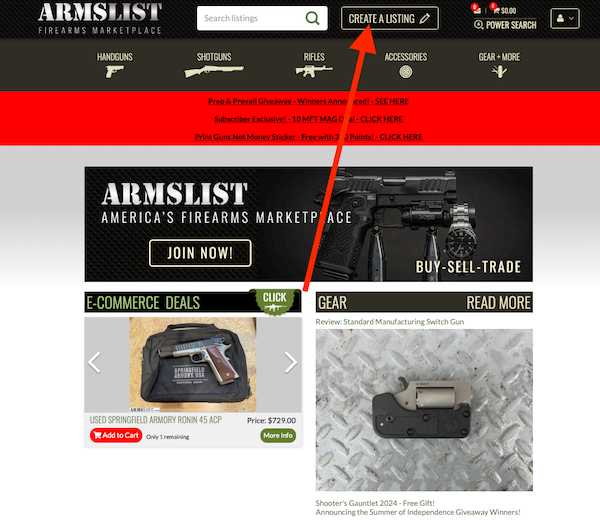
Scroll to the very top of any page you're on.
To the right of the logo is a button that says "Create a Listing" as shown in the image, (or a pencil logo on mobile).
Alternatively, follow this link to create a listing.
Enter your listing information. A confirmation email will be sent to the provided email address.
Activate your listing by clicking the link in this confirmation email. Your listing will appear within a few minutes.
"Bumping" your listing sends it to the top of the stack of the classifieds section. You can bump your listing every five days. To bump your listing, head to your Account Dashboard, click "My Listings," click "Edit," on the item you would like to bump, and then if eligible you'll see a button for "Bump." Click "Bump." You should now see a countdown timer to the next time your listing is eligible to bump
Be patient. For performance reasons, the listings pages are only updated
every few minutes. If it has been more than an hour and you do not see your listing, please contact us as your listing
may have been trapped in our spam filters.
There is no way to completely remove a listing, but you can deactivate your listing. Deactivating your listings will prevent buyers from being
able to contact your and will remove your listings from displaying in searches.
No, one location, and one location only. If someone finds it in their home location, they assume they can go to your location and make a deal. If
they find it in a faraway location, they assume it must be shipped. Your listing will still be found through searches. Browsers are then able to filter by "Dealers that Ship" when searching for an item.
ARMSLIST is purely a service provider that allow sellers to list items. As such, ARMSLIST can not and will not be
a party in transactions. It is the sole responsibility of the buyer and seller to conduct safe and legal transactions.
Please flag the listing as "scam", this will remove the listing from the site.
Please contact us with a link to the listing so we can remove the listing.
Follow these common sense rules to help avoid getting scammed:
Transact in person, with one of our verified Premium Vendors, or through our recommended escrow partner GunTab - This will help you avoid almost all scams!
Never send Cashiers Checks or Money Orders to sellers
Never wire money via Western Union, Moneygram, or other wire services
Never accept Cashiers Checks or Money Orders as they can be easily faked
Never give out financial information
Avoid deals involving shipping, unless you use our recommended escrow partner GunTab
If a deal is too good to be true, it probably is
ARMSLIST is not involved in any transaction, we do not handle payments, guarantee transactions, provide escrow services, or offer
"buyer protection," or "seller certification."
We take every precaution to prevent scammers from using the site. Unfortunately, beyond our efforts to prevent scammers there is little we can do.
You are the best resource to prevent and stop scammers. Please take the steps listed previously if you are the victim of a scam. Also, please refer to our tips and heed the warnings on the site on how to prevent getting scammed.
Head to the We Buy Any Gun tab in your account home. Click "Click here to sell your gun now!"
Fill in the required fields...be sure to be as detailed as possible, and take great, landscape oriented pictures (not stock photos). Click save, and bang!
The details and pictures of your firearm are now being sent to Premium Vendors in your area so that they can review and make you an offer, or pass on your firearm.
No, it does not (unless you opted into We Buy Any Gun when creating a classifieds listing). The details of your We Buy Any Gun listing are only sent to Premium Vendors in your immediate area and are not available to other Premium Personal users. You must click “Create a Listing” (on desktop) or “List” (on mobile) in order to begin the process to create a listing that will reside in the Armslist classifieds section available to be viewed by other Premium members.
Please do not refresh the page and wait while we are
processing your payment. This can take a few seconds.
FIREARMS DEALS!
Get the best deals on guns, ammo, optics, and more! Enter your email, click "SIGN UP", and we'll send them straight to your inbox!